WorkSpace Administrative
Actions Widget
This AWS Workspace Management Widget simplifies the process of monitoring and managing virtual desktops by providing a user-friendly interface and direct-action capabilities. With this widget, you can ensure your WorkSpaces are running optimally and take immediate actions when needed.
What It Does
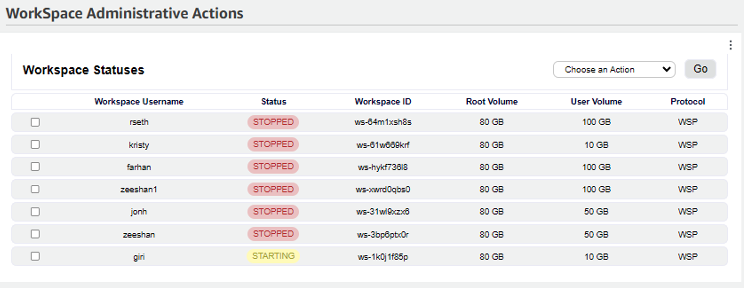
The Administrative Actions widget connects directly to your AWS account via Boto3, retrieves real-time WorkSpace data, and presents it in a clean table interface. From there you can take immediate management actions without ever leaving the dashboard.
- Real-time WorkSpace status monitoring
- Direct management actions from the dashboard
- User-friendly table interface
- Supports all standard AWS WorkSpace operations
How It Works
Connecting to AWS WorkSpaces
Uses the Boto3 library to communicate with AWS Services, fetching information about all WorkSpaces in your AWS account securely and efficiently.
Gathering Workspace Information
Retrieves a full list of WorkSpaces with the following details for each:
- Username
- Status (Available, Stopped, etc.)
- Workspace ID
- Root Volume Size
- User Volume Size
- Connection Protocol (PCoIP, WSP)
Display Interface
WorkSpace data is rendered in a clean, readable table format using HTML and CSS — making it easy to scan dozens of WorkSpaces at a glance and act quickly.
Management Actions
A dropdown menu lets you perform actions on any WorkSpace instantly:
- Reboot
- Rebuild
- Start
- Stop
- Migrate
- Modify Protocol
- Modify Compute Type
Handling User Selections
When you select an action from the dropdown and click "Go," the widget sends a request directly to AWS to perform the selected action on the chosen WorkSpace — no extra steps, no console switching.
Ready to Take Control?
See the full Workspace Insights Commander suite and get started today.